
When you click and buy through our links we may earn a commission, at no extra cost to you. Your support allows us to keep delivering independent research for you.
Apple Watch Series 11 Review
A Versatile Smartwatch for Sleep, Health, and Daily Tracking
By Ella Carter
Product Reviewer, Sleep Tech
Updated May 15, 2026
Apple Watch Series 11 is another sleep tracker worth considering for iPhone users who want sleep tracking alongside workouts, notifications, and broader health features. Unlike more sleep-focused devices like Oura Ring 4 or WHOOP 5.0, the Apple Watch is designed first as an all-purpose smartwatch, with sleep tracking built into Apple’s broader health ecosystem.
It tracks sleep stages, heart rate, respiratory rate, and other overnight vitals, then connects that data with workouts, activity, and long-term trends inside Apple Health. For people who already want a smartwatch for everyday use, the Apple Watch can still provide useful sleep insights alongside its broader fitness and wellness features.
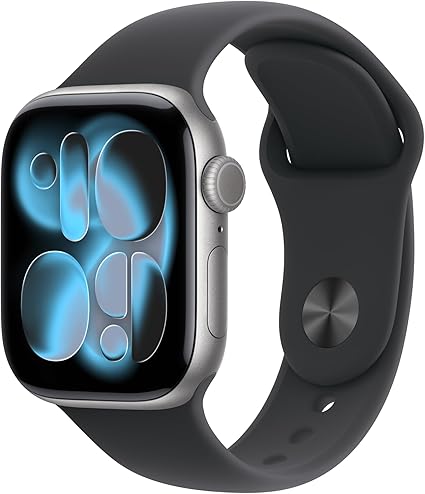
Apple’s all-in-one smartwatch for sleep tracking, wellness, workouts, and daily health.
| Specifications | Details |
|---|---|
| Type | Smartwatch |
| Battery | ~24 hours (up to 38 hours in Low Power Mode) |
| Subscription | No |
| Works with | iPhone only |
| Water resistance | 50 m (WR50; safe for swimming & showering) |
| Size | 42 mm or 46 mm case sizes (multiple band options) |
Best For:
Apple Watch Series 11 is a smartwatch with reliable sleep tracking built into Apple Health. It’s ideal for iPhone users who want sleep tracking, fitness, and health features in one device, but less ideal if you want multi-day battery life or a screen-free sleep tracker.
Our Take
Apple Watch Series 11 may make sense for iPhone users who already want a smartwatch and would like sleep tracking built into Apple Health. What stands out most is how sleep data connects with workouts, activity, and other long-term health trends inside Apple’s broader ecosystem.
That said, if sleep tracking, overnight comfort, or recovery insights are your main priority, I’d start with Oura Ring 4, WHOOP 5.0, Fitbit Inspire 3, or Withings Sleep Pad before choosing the Apple Watch. For most people, the Apple Watch works better as a broader smartwatch with sleep tracking included, rather than a sleep-first tracker.
The main tradeoff is battery life. Because the watch typically needs daily charging, you have to plan around when you charge it if you want consistent overnight tracking. Still, if you want one device that handles sleep, health, fitness, and everyday smartwatch features, the Apple Watch Series 11 is one of the most versatile options available.
What We Like
- Sleep tracking that’s easy to understand
Apple Health presents sleep stages, overnight vitals, and longer-term trends in a simple, easy-to-read format that works well for everyday tracking. - Women’s health and cycle tracking
Apple’s Cycle Tracking features use wrist temperature trends to help estimate ovulation and show cycle-related patterns that may help explain changes in sleep and energy over time. - Sleep data connects with the rest of your health data
Apple Health connects sleep data with workouts, activity, and other wellness metrics, making it easier to spot long-term patterns between daily habits and sleep.
What To Know Before You Buy
- Battery usually needs daily charging
The Apple Watch typically lasts about a day on a full charge, so you’ll need to be a little intentional about when you charge it if you want to track sleep every night. - Works with iPhone only
Apple Watch only works with iPhones. If you use Android, you’ll need to consider another sleep tracker. - Sleep tracking isn’t the main focus
Sleep tracking is solid, but the watch is designed as an all-in-one smartwatch rather than a dedicated sleep-first tracker like Oura or WHOOP.
Apple Watch Series 11: A Smartwatch First, Sleep Tracker Second
The Apple Watch Series 11 may still be worth considering if you already want an Apple smartwatch for workouts, notifications, and broader health features. Its sleep tracking tools are useful, especially if you already use Apple Health and want your overnight data connected with the rest of your activity and wellness trends.
But compared with more sleep-focused options like Oura Ring 4, WHOOP 5.0, Fitbit Inspire 3, and Withings Sleep Pad, the Apple Watch is still designed first as an all-purpose smartwatch. The daily charging and smartwatch-focused design may make it less appealing for people who want a simpler, more sleep-focused experience.
For people who already want a smartwatch for everyday use, though, the Apple Watch can still provide helpful sleep insights alongside its broader health and fitness features.
View Apple Watch Series 11 on Amazon
Frequently Asked Questions (FAQs)
Apple Watch is considered fairly accurate for estimating sleep duration and general sleep patterns, though like all consumer sleep trackers it isn’t as precise as a medical sleep study. It uses motion sensors, heart-rate data, respiratory rate, and other signals to estimate sleep stages and overnight trends over time.
In practice, it’s best used to spot long-term sleep patterns and habits rather than focusing on the exact number of minutes spent in each sleep stage.
Apple Watch Series 11 can still be useful for sleep tracking, especially for people who already want an Apple smartwatch for workouts, notifications, and everyday health features. It tracks sleep stages and overnight vitals inside Apple Health, but compared with more sleep-focused trackers like Oura Ring 4, WHOOP 5.0, Fitbit Inspire 3, or Withings Sleep Pad, the Apple Watch is designed more as a general-purpose smartwatch than a dedicated sleep tracker.
Looking for a More Sleep-Focused Tracker?
If your main priority is sleep tracking, overnight comfort, recovery insights, or long battery life, you may also want to explore our Best Sleep Trackers of 2026 guide. It compares our top sleep-focused picks, including Oura Ring 4, WHOOP 5.0, Fitbit Inspire 3, and Withings Sleep Pad, and explains which type of tracker may fit your sleep habits best.
How We Choose Our Picks
The Sleep Scoop team reviews sleep tech with real-life women’s sleep challenges in mind, prioritizing comfort overnight, ease of use, and insights that actually help you change habits. Our process varies by product type, but we always ask the same things: does it deliver, who is it best for, and is it worth the cost?
To answer these questions, we combine editorial research, real user feedback, and hands-on testing when possible. We look for patterns in long-term reviews across major retailers and app stores, including women’s feedback where available, and then cross-check what we find with product specs and expert context.
We update our guides as products, apps, and features change. If you buy through our links, we may earn a small commission at no extra cost to you. Your support helps us keep The Sleep Scoop reviews independent and regularly updated.